If you create content in 2026, you probably already feel it. Video is no longer hard because of ideas. It is hard because of production.
AI video tools are changing that fast. You can turn a simple prompt into a full video. You can test ideas in minutes. You can produce content without cameras, crews, or long editing cycles.
But here is the real problem.
There are too many AI video tools now. Every tool says it is the best. Some focus on realism. Some focus on speed. Some focus on editing control.
So the real question is not “which tool is the best.”
It is:
Which AI video tool actually fits your workflow?
In this guide, I break down the most useful AI video tools in 2026 based on real work, not marketing claims.
How I Evaluated These AI Video Tools
I did not rank these tools based on hype or popularity. I focused on real usage.
First, video quality matters. I looked at realism, motion stability, lighting, and scene consistency.
Second, workflow speed matters. Some tools generate good videos but slow down production too much.
Third, editing control matters. A useful tool should allow refinement after generation.
Fourth, flexibility matters. Tools that support multiple AI models are more useful than single-model systems.
Fifth, real value matters. I checked if the tool actually saves time or just adds extra steps.
Best AI Video Tools for Creators in 2026
Now let’s break down the tools that actually matter in real workflows.
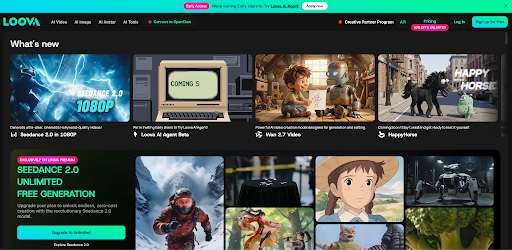
1. Loova – Best All-in-One AI Video Platform
Loova is not just a single AI video generator. It is a full creation platform that combines multiple AI video and image models in one place.
What makes it different is workflow integration. Instead of switching tools, everything happens in one system.
You can:
- Generate video from text prompts
- Turn images into video
- Use reference-based generation
- Edit and refine inside the same platform
- Create AI images for thumbnails, ads, and visuals
Loova also supports multiple AI models, so you can test different outputs without leaving the platform.
This is useful when you are producing content regularly and need speed plus flexibility.
Best for: creators, marketers, teams, and anyone scaling content production
2. Seedance – Best for Cinematic Motion Control
Seedance focuses heavily on motion quality and consistency. It supports image to video, text to video,reference to video and video editing.
It is known for:
- Smooth camera movement
- Stable character animation
- Strong scene consistency
- Better control over cinematic flow
It also supports reference-based generation, which helps maintain visual structure across scenes.
The strength here is direction control. You can guide how the scene moves more precisely than many tools.
Best for: cinematic creators and storytelling-focused videos
3. Grok Imagine – Best for Creative Experimentation
Grok Imagine is more experimental in nature.
It is designed for exploring ideas quickly rather than producing final polished content.
It performs well when you want:
- Unexpected visual outputs
- Fast idea testing
- Creative variations from one prompt
- Abstract or stylized results
But results are less predictable compared to structured tools.
Best for: creative brainstorming and concept exploration
4. Kling – Best for Realistic Video Output
Kling is known for strong realism and natural motion.
It focuses on:
- Real-world lighting accuracy
- Human-like movement
- Detailed textures
- Stable visual quality
It performs especially well in scenes involving people or realistic environments.
However, it is less flexible in editing compared to all-in-one platforms.
Best for: realistic short videos and character-based scenes
5. Vidu – Best for Fast Video Generation
Vidu is built for speed. It is designed for creators who need quick output rather than deep control.
Strengths include:
- Fast rendering time
- Simple user flow
- Easy prompt-based creation
- Good for short-form content
It is not focused on advanced cinematic control, but it is efficient.
Best for: short-form content creators and daily posting workflows
6. VEO (Veo 3.1) – Best for High-Quality Long Video Generation
VEO 3.1 focuses on high-quality and longer video generation.
It is strong in:
- High-resolution output
- Smoother scene transitions
- Strong prompt understanding
- Long-form video generation
It also supports advanced features like structured start and end frame control for better continuity.
This makes it useful for more structured storytelling.
Best for: long-form cinematic content and high-detail videos
7. PixVerse – Best for Social Media Content
PixVerse is designed with social content in mind.
It focuses on:
- Template-based generation
- Easy prompt input
- Viral-style visual output
- Quick content creation for social platforms
It is beginner-friendly and works well for short-form content.
However, customization is more limited compared to advanced tools.
Best for: TikTok, Instagram, and fast social content creation
8. Wan – Best for Stylized Visual Content
Wan focuses on artistic and stylized video generation.
It is good at:
- Unique visual styles
- Creative rendering
- Non-realistic aesthetics
- Strong artistic identity
It is not designed for realism, but more for visual expression.
Best for: stylized content, artistic projects, and creative visuals
Quick Comparison Overview
Here is how these tools compare in real use cases:
Best all-in-one workflow
Loova stands out because it combines generation, editing, and multiple models in one platform.
Best cinematic control
Seedance and VEO are strong for structured storytelling and motion control.
Best realism
Kling produces the most natural-looking human motion and lighting.
Best speed
Vidu and Pixverse are fastest for short-form content creation.
Best creative exploration
Grok Imagine and Wan are better for experimental or stylized outputs.
How to Choose the Right AI Video Tool
Instead of asking “which tool is best,” it is better to ask:
What do I need most?
If you need speed and scale, choose fast-generation tools.
If you need realism, choose Kling or VEO.
If you need cinematic control, choose Seedance.
If you want flexibility across everything, an all-in-one system like Loova is more efficient because it removes tool switching.
Final Thought
AI video tools in 2026 are no longer about one “perfect model.”
They are about workflow.
Some tools are fast. Some are realistic. Some are creative. Some are structured.
The real advantage comes when you match the tool to the task instead of forcing one tool to do everything.
That is why more creators are moving toward platforms that combine multiple models in one place instead of relying on a single system.
If you want to test different AI video models without switching tools, Loova is one option that brings them together in a single workflow.
FAQ
What is the best AI video generation tool in 2026?
There is no single best tool. Loova is strong for all-in-one workflows, while Kling, Seedance, and VEO are strong for specific use cases like realism or cinematic control.
Which AI video tool is best for beginners?
Pixverse and Vidu are easiest to start with because they focus on speed and simple prompts.
Which AI video tool produces the most realistic videos?
Kling is known for strong realism, especially in human motion and lighting.
What is the fastest AI video generator?
Vidu and Pixverse are among the fastest tools for short-form content creation.
Can I use AI video tools for commercial content?
Yes, but usage rights depend on the platform’s licensing terms, so always check before publishing.
What is the advantage of all-in-one AI platforms like Loova?
They combine multiple AI models, video generation, editing, and image tools in one workflow, which reduces switching between tools and speeds up production.