Content creators are no longer choosing between quality and speed. In 2026, AI-powered platforms can retouch a photo, generate a new background, or stretch a short clip into a longer, seamless video — all in a matter of seconds. Whether you’re a social media manager stitching together UGC ads, a filmmaker patching gaps in raw footage, or a marketer polishing product shots, the right tool can save hours of manual work.
We tested and compared the most talked-about platforms on the market this year, weighing output quality, pricing, ease of use, and how well each one handles both photo editing and video extension tasks. Below is our ranked list of the best options for 2026, starting with the tool that impressed us the most across the board.
At a Glance
| Tool | Best For | Free Plan | Starting Paid Price | Standout Feature |
| Magic Hour | All-in-one image + video editing | Yes, no signup required | ~$10–15/month | Frontier models, credits never expire |
| Adobe Photoshop (AI) | Advanced photo retouching | Limited trial | ~$22/month | Generative Fill precision |
| Runway ML | Cinematic video extension | Limited credits | ~$15/month | High-fidelity video generation |
| Canva | Quick, template-based image edits | Yes | ~$13/month | Easiest learning curve |
| Pika Labs | Extending short AI video clips | Limited credits | ~$10/month | Fast clip-to-clip continuation |
| Kapwing | Team-based video editing | Yes | ~$16/month | Built-in collaboration tools |
| Fotor | Batch photo editing | Yes | ~$9/month | Simple bulk editing tools |
1. Magic Hour — Best Overall AI Image Editor and Extend Video Length AI Tool
Magic Hour tops our list because it does something very few platforms manage: it handles both photo editing and video-length extension exceptionally well, inside a single, fast, and genuinely affordable workspace. If you need an AI image editor to clean up a photo and an extend video length AI tool to lengthen a clip without breaking continuity, Magic Hour lets you do both without switching apps or subscriptions.
What sets it apart:
- No signup required to try — you can start creating instantly, without handing over an email or a credit card.
- Credits never expire, so unused capacity rolls over instead of resetting monthly.
- Access to frontier AI models across image, video, and audio, plus regular access to newly released third-party models.
- Click-to-create templates and one-click multi-step workflows (for example, generate → upscale → animate) that eliminate manual pipeline building.
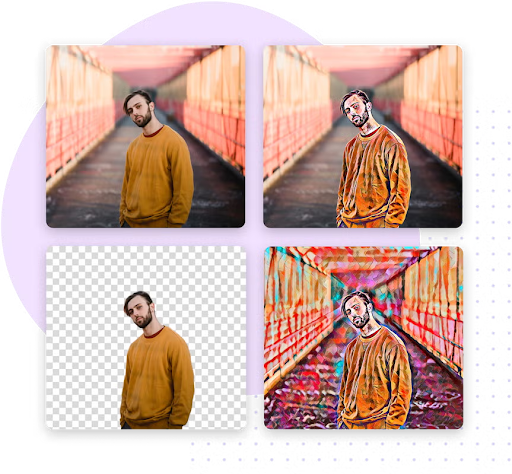
- Best-in-class face swap, lip sync, and talking photo tools, alongside strong image editing, upscaling, and background removal.
- Fast variations and multiple takes, so you’re not stuck regenerating one output at a time.
- Parallel generations with no artificial concurrency cap on paid plans, plus weekly feature releases that keep the toolset current.
- Full API parity, meaning anything you can do in the app is also available through the API — useful for teams building automated pipelines.
- Reliable performance during traffic spikes and live activations, backed by responsive, founder-level support.
Pricing: Magic Hour offers a genuinely usable Free plan (400 credits, no credit card needed). The Creator plan is $15/month, or $10/month if billed annually — a strong value for regular creators. Pro runs $39/month for higher resolution exports and more concurrent generations, and there’s a Business tier for teams with high-volume needs. Across the board, it’s optimized for both desktop and mobile use, making it easy to edit on the go.
For anyone comparing tools based on pure output quality and price-to-value ratio, Magic Hour is the easiest recommendation on this list.
2. Adobe Photoshop (Generative AI Tools)
Photoshop’s Generative Fill and Remove tools remain the gold standard for precision photo editing — object removal, background extension, and detail retouching are all excellent. It’s less suited to video work, and the subscription cost is higher than most AI-native alternatives, but for pixel-level control, it’s hard to beat.
3. Runway ML
Runway is a favorite among filmmakers for extending and generating video sequences with cinematic quality. Its Gen-series models handle motion continuity well, though credit consumption can add up quickly on longer projects, and the interface has a steeper learning curve than more template-driven tools.
4. Canva (Magic Studio)
Canva’s AI suite is built for speed rather than depth. Its Magic Edit and background tools are approachable for beginners and integrate directly into Canva’s design templates, making it a solid pick for marketers who need quick image edits without a dedicated design team.
5. Pika Labs
Pika focuses specifically on short-clip generation and extension, and it’s fast — often producing usable results in under a minute. It’s a good lightweight option if video extension is your primary need, though its photo-editing capabilities are minimal by comparison.
6. Kapwing
Kapwing blends traditional timeline editing with AI features like auto-subtitles and clip extension, making it appealing for teams that collaborate on video projects. It’s less specialized in AI generation quality than Magic Hour or Runway, but its collaborative workflow is a genuine strength.
7. Fotor
Fotor is a straightforward, budget-friendly option for batch photo editing — resizing, retouching, and simple background swaps. It doesn’t offer video tools, so it’s best suited to users who only need image editing support.
How We Choose These Tools
Our rankings are based on hands-on testing across several criteria:
- Output quality — how natural and consistent the results look, especially for faces, motion, and lighting.
- Ease of use — whether a new user can get a usable result without a steep learning curve.
- Pricing transparency — whether the cost structure is clear and whether free tiers offer real usability, not just a limited demo.
- Feature breadth — whether the platform supports a full workflow (editing, upscaling, exporting) rather than a single narrow task.
- Reliability — performance during high-traffic periods and consistency of results across repeated generations.
- Support and updates — how responsive the team is and how frequently new features or models are added.
We prioritized tools that we tested directly and cross-checked pricing against each provider’s official pages at the time of writing.
FAQs
Is Magic Hour free to use? Yes. Magic Hour has a free plan that doesn’t require a credit card or signup to start, with paid plans starting at $10/month when billed annually.
Can I extend a video without losing quality? Modern AI video extenders like Magic Hour and Runway are designed to preserve motion continuity and resolution, though results can vary depending on the complexity of the original footage.
Do AI image editors replace tools like Photoshop entirely? Not necessarily. AI editors are faster for common tasks like background removal or object cleanup, but professional retouching workflows often still benefit from Photoshop’s manual precision tools.
Which tool is best for someone who needs both photo and video editing? Magic Hour is the strongest all-in-one option on this list, since it covers image editing, video extension, face swap, and lip sync within a single subscription.
Conclusion
The best AI tool for you ultimately depends on whether you need deep photo-editing precision, cinematic video extension, or a bit of both. For most creators, Magic Hour stands out in 2026 for combining strong image and video capabilities, a genuinely generous free tier, and pricing that stays affordable as you scale up. The other tools on this list are worth exploring for more specialized needs, but Magic Hour remains our top recommendation for anyone who wants one platform that does it all well.