Filed stills already carry a credit line. The photographer shot one street, one face, and one stretch of weather, then put a name under the frame. A magazine social desk that later asks a picture to video ai tool to “make it move” can keep that credit honest, or it can grow a second person the photographer never met. The still is the claim. Motion is only a short extra gesture.
The person this usually hurts is not the section editor. It is the photographer who already delivered the assignment file. That person cannot stop the post. They can only refuse the credit if the clip stops looking like their picture. Extra heads, a new sky, or a brighter shopfront are not style notes to them. They are a different photograph wearing their name.
Filed Stills Already Carry One Visual Claim
A local magazine still is rarely a mood board. It is a record of one place at one time: a market stall, a doorway on Chapel Street, a face at a community hall. The caption and the byline both depend on that record staying true. Once the picture is filed, the job of motion is small. It can lift a flag, drift a little crowd, or hold the same face while the background breathes. It cannot invent a second stall or a cleaner sky and still use the same credit.
Readers do not separate the moving file from the still in the article. They see one story. If the clip shows a person who was not in the photograph, the credit starts to look sloppy. If the weather changes, the date in the caption starts to look invented. The photographer then has to explain a picture they did not make.
That is why this job begins with the filed file, not with a written scene. The still is already the brief. Anything that cannot be pointed to in that file does not belong in the motion request.
Extra Faces And New Weather Break Credit
Credit breaks in small ways. A shoulder becomes a second shopper. A puddle becomes sunshine. A closed shutter becomes an open door. None of those changes look dramatic on a large preview. They look wrong the moment the clip sits beside the original still in the story ticket.
Designers usually catch this only after the file leaves the generator. The first version looked fine until it sat next to the assignment photo. That is the pass rule: same still, same crop the byline will use, same weather, no new person. If one of those rows fails, the clip does not go to social.
| What the still already states | What to inspect in the clip | Reject when |
| People in the frame | Count and faces at the crop used under the byline | The clip invents a second person or changes a face |
| Weather and time of day | Sky, wet ground, shop lighting | The clip replaces rain with sun or night with noon |
| Place marks | Street signs, stall names, doorway type | The named place becomes a generic street |
The table is a gate, not a score. A lively camera move cannot rescue a new face. If the photographer would not sign the moving file, the desk should not post it.
Judge The Byline Crop Not The Preview
Most credit damage shows up at the size readers actually see. Drop the clip into the social tile or the article header that will carry the photographer’s name. A face that fills a desktop player can smear on a phone card. A stall sign that looked sharp in the generator can fall off the edge once the tile crops in.
Keep the same still each time you review a motion idea. Memory is a weak witness. If the moving file cannot sit next to the original without a second look, the credit is already in trouble.
Keep The Light The Photographer Already Shot
Light is easier to excuse than a new face, which is why it slips through. A “cinematic dusk” prompt can look premium on a large screen and still break a picture shot at noon outside a grey precinct. Compare the clip next to the original. If the hour of day no longer matches the caption, treat that as a reject rather than a grade.
The same rule applies to extra haze, sparks, and drifting litter the photographer did not see. Those effects bury small place marks. If a street name disappears into glow, the file would never clear a credit check, even when the motion itself looks smooth.
Text To Video Has No Photo To Protect
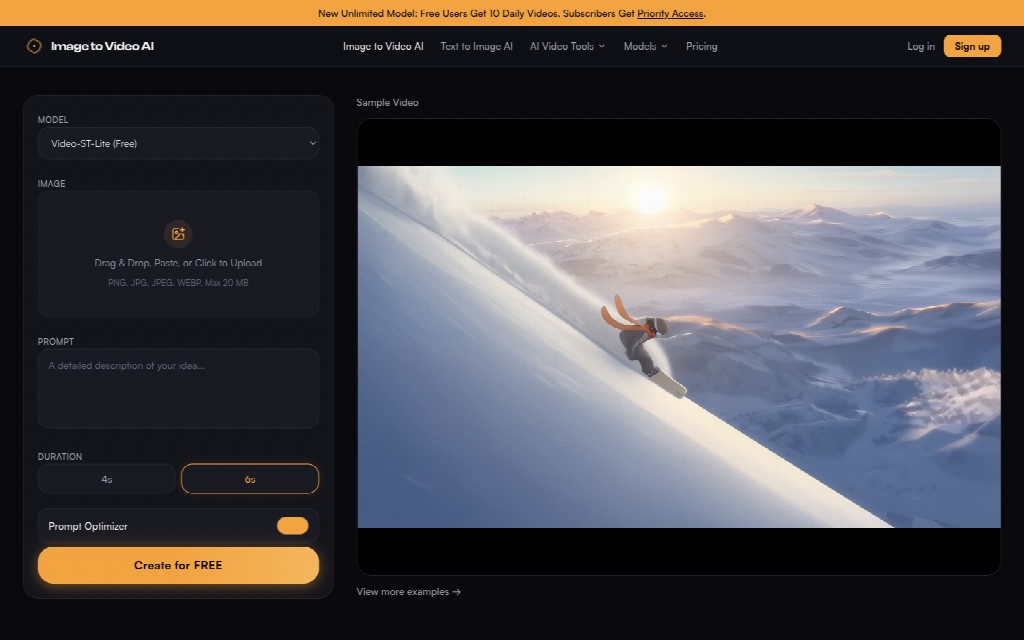
Image to Video AI now sits beside a second door: a text-to-video lane that does not ask for a picture at all. You type a scene, pick 4s or 6s, and generate. That lane is useful when nobody filed a still. It is the wrong door for an assignment photo. The text box has nothing to protect. It can invent a street, a crowd, and a sky from adjectives. The photographer’s file never enters the job.
The two lanes are easy to mix up because they share the same short lengths and the same Create for FREE button. The difference that matters is the input. Image to video starts from a photo. Text to video starts from a sentence. If the desk already has a filed still, starting from a sentence throws away the only object that can keep the byline honest.
The Text Lane Invents A Whole Scene
A text prompt can sound close to the caption and still make a different picture. “Busy Salford market in light rain” is a description, not the stall the photographer stood in front of. The generator has no duty to the real wet ground or the real handwritten price card. It will build a plausible market. Plausible is not filed.
That is also why the text lane wasted an hour of desk time. People keep adding adjectives to chase a resemblance that the tool was never given. The assignment file was sitting on disk the whole time. Use it. Do not retype the scene and hope the invented street matches the one in the article. That rework sent the still back to the photographer for a credit they should not have to defend.
Paste The Assignment File Instead Of Retyping
The image lane accepts a paste, a click, or a drag. PNG, JPG, JPEG, or WEBP, up to 20 MB. Paste the filed still. Do not grab a compressed social screenshot and do not describe the photo from memory. The paste step is the credit lock. Once that file is in the box, the prompt only has to name one movement.
If the still is too heavy, shrink the original export rather than switching to text. A smaller honest file is still the photographer’s picture. A beautiful sentence is not.
Ask For One Camera Move Then Stop
The official path is short: upload the still, write a motion line, choose 4s or 6s, then generate. That shortness helps credit work. There is little room for a second story. Use it that way. “Hold the stallholder and let the market drift behind her” is something a desk can inspect. “Make the street come alive” is not.
On a picture to video ai workspace, the duration choice is a limit, not a feature hunt. Four seconds is enough for a flag or a slight push. Six seconds is enough for a slow look across a doorway. Neither length is a reason to add weather, extra people, or a new shopfront. If the first pass invents a face, do not buy a longer adjective list. Change the still or shrink the request.
Image to Video AI will not write a credit policy for you. It will only move the pixels you already filed. The photographer’s name stays attached only if those pixels still match the assignment.
Hold The Credit Line On Social Clips
Image to Video AI fits a magazine social clip when the still is already filed and the motion request is narrow. Use the image lane, not the text lane. Paste the assignment file. Ask for one move. Judge the result on the byline crop, not on the generator’s large preview.
The right finish is conservative. Keep the same people, keep the same weather, and discard any clip that asks the photographer to sign a new street. Used that way, the generator supports the still instead of replacing it.
If the moving file would never clear editorial credit, it should never reach the scheduler. That single discard is cheaper than a public correction under the photographer’s name. The clip is discarded, and the still stays as filed.