Receipts can accumulate quickly, whether they come from everyday purchases, business expenses, tax records, or household projects. Keeping track of them becomes more difficult when paper receipts are stored in folders, drawers, or boxes and need to be referenced later. Scanning receipts can provide a practical way to create digital records while reducing the amount of paper that needs to be stored.
The right scanner depends on how often receipts are processed, what other materials need to be digitized, and how those files will be managed afterward. A home user who scans a handful of receipts each month may have different requirements than a small business that processes paperwork every day.
Understanding the available scanner types and software options can make it easier to build a system that fits those needs.
What Features Matter When Comparing Receipt Scanners and Flatbed Scanners
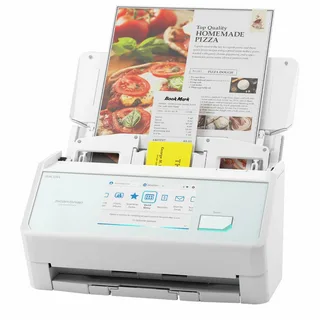
When comparing a best receipt scanner, it is helpful to look beyond basic scanning ability. Receipt scanners may be designed to accommodate the smaller paper sizes and varied formats commonly found in financial records. Features such as automatic feeding, image quality, double feed detection, and scanning speed can affect how efficiently documents are processed.
Paper handling is particularly important when scanning receipts because they may vary in thickness, size, and condition. A scanner that can consistently handle different types of paper can make the process easier, especially when multiple receipts are being processed at once.
A flatbed scanner offers a different approach. Instead of feeding loose sheets through a document path, users place the item directly on a glass scanning surface. This can make flatbed models useful for materials that are fragile, unusually shaped, or not suitable for an automatic document feeder. Photographs, books, certificates, and other delicate items may also benefit from a flatbed design.
The choice between these approaches often comes down to the materials being scanned. Someone focused primarily on loose receipts and paperwork may prioritize efficient document handling, while someone who wants to scan a broader range of materials may prefer the flexibility of a flatbed.
Scanning volume should also be considered. A business that processes large quantities of receipts may place greater importance on speed and automation, while occasional users may care more about simplicity and versatility.
How ScanSnap Home Helps Organize Receipts and Scanned Documents
Scanning a receipt is only the first step. Once a physical document becomes a digital file, it needs to be stored and organized in a way that makes it easy to find later. A consistent digital filing system can save time when receipts are needed for expense reports, reimbursements, budgeting, or tax preparation.
ScanSnap Home provides tools for managing scanned documents and other content in one place. Users looking into a scansnap home download can explore software designed to help organize and manage scanned files after they have been captured.
A useful system can include consistent file names, categories, folders, and other organizational methods. For example, receipts could be organized by month, expense type, project, or business department depending on the user’s needs. The more consistent the system is, the easier it can be to locate a specific document months later.
Digital organization can also reduce the need to keep large collections of physical receipts. While some original documents may still need to be retained, having searchable digital copies can make everyday recordkeeping more convenient.
For home users, digital receipt storage can support household budgeting and personal recordkeeping. For businesses, organized scanning can help employees manage expenses and keep important documentation accessible.
Ultimately, choosing the right receipt scanner involves considering both the hardware and what happens after the scan is complete. Receipt focused scanners can streamline repetitive document processing, flatbed scanners can provide greater versatility for different materials, and document management software can help keep digital files organized. Together, these tools can create a more practical approach to managing paper records at home or in the office.