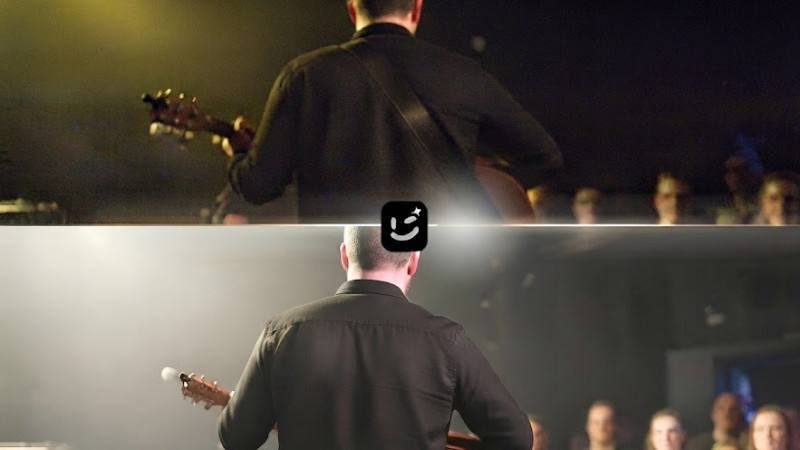
Across Salford, thousands of photographs capture the moments that bring communities together. A live music night at a local venue, an arts workshop in a community centre, a neighbourhood festival, or a street event organised by local groups — these images record the people and places that shape the city’s identity.
Many of these photos are stored on old hard drives, shared social media pages, community websites, or personal phone galleries. Some are from years ago when phone cameras produced smaller files and digital storage was limited.
The memories are still valuable, but the images may not be ready for today’s platforms.
A photo from a local music event might look blurry when displayed on a website. A community mural project captured in low light may lose its colours. An old festival image may have a watermark, date stamp, or unwanted background detail that distracts from the moment.
For arts groups, neighbourhood organisations, and local photographers, improving these images can help preserve Salford’s creative history and make it easier to share with new audiences.
Why community event photos often lose quality
Professional photos are planned. Community event photos aren’t. They’re taken fast, by whoever is closest — the organiser, a performer, a parent, a volunteer. So what you end up with is a real mix. Quick phone pics, old files from early digital cameras, photos that have been forwarded and re-uploaded five times over.
Taking photos inside community venues is also challenging because the lighting there is poor, which tends to leave images looking grainy and dark. At the same time, fast-moving performances almost always lead to motion blur. These issues do not mean the original photos are no longer useful. A little cleanup can make them much easier to share, print, or add to a community archive.
Give old community images a second life with Wink AI
Wink is an AI-powered platform for enhancing photos and videos without learning a complex editing workflow. It combines tools to improve clarity, increase resolution, and clean up unwanted marks.
For local groups and community organisers, its free image enhancer helps with common problems like fixing low brightness, noise, or soft details. Take a dark concert image — you can brighten it enough to see the performers and the atmosphere, without making it look like a different event.
And when a small image needs to appear larger, its image upscaler increases the resolution so details hold up on posters, websites, digital screens, or printed materials. It’s useful for older photos pulled from old websites, scanned prints, or early digital cameras.
How to restore the event photos
Improving a large collection of community images does not need to become a long editing project. The following simple process can help groups prepare photos more efficiently.
1. Choose the photos worth keeping
Start with images that show important local events, performances, workshops, murals, or community spaces. For Salford arts groups, these are often the moments that are hardest to re-shoot — a one-night music gig, a neighbourhood festival, or a community mural unveiling.
Check for the original file first, since photos saved from social media or messaging apps may already have reduced quality. The original from a phone camera roll, old hard drive, or community website backup will have more detail to restore than a compressed copy from Facebook Messenger. Make a shortlist of your most valuable images before you start editing.
Once you have your shortlist of 20-30 key photos, open Wink — all the tools you need are in one place on the Image dashboard.
2. Enhance the photo quality
For images that look dark, faded, noisy, or slightly blurry, use Wink’s free image enhancer. It can improve lighting, colour, sharpness and visible detail while keeping the original scene recognisable.
The process is simple: upload the photo, let Wink process it, and check the enhanced version before saving it. There is no need to adjust several settings manually, which makes quick fixes easier for volunteers and community groups.
For live music and evening events, Wink offers a dedicated Concert scenario inside Image Enhancer.
As you can see in the interface, you can select Regular > Concert mode, which is tuned for stage lighting, low light and fast movement. A dark concert image where the singer is lost in haze or tinted blue by stage lights can be adjusted to bring out skin tones, clothing texture, and the atmosphere of the crowd, without over-smoothing.
3. Upscale photos for bigger displays
A small image may look fine on a phone but become blurry when placed on a poster, website banner, or exhibition display.
Wink’s image upscaler can increase the resolution to HD, 2K or 4K and help preserve important details as the image gets larger. This makes older community photos easier to reuse for local exhibitions, event promotions, digital archives, and social media posts — one restored file can work for both a large printed board and a website header.
Image upscaling is essential for Salford community archives, where one photo often needs to work as both a small website thumbnail and a large exhibition print. For groups handling dozens of images from festivals or music nights, the batch enhancement feature is especially useful.
Wink image enhancer supports batch uploading an entire album, so you can fix blurry photos, enhance screenshots, and increase image size online without doing each one separately. It runs smoothly with fast downloads, which saves hours for volunteer teams.
This makes older community photos easier to reuse for local exhibitions, event promotions, digital archives, and social media posts, all from one restored master file.
Keeping Salford’s creative history visible
Salford’s arts and community scenes continue to change, but photographs help preserve the people and events behind that story. A photo from a local music night can show the energy of a venue years later. Images from neighbourhood projects can highlight the work of volunteers and artists. Festival photographs can remind communities how traditions have grown over time.
Many of these images already exist. They simply need better quality before they can be shared again. AI enhancement tools such as Wink provide a practical way for local groups to improve older photos, increase resolution, and remove unwanted marks without needing professional editing skills.
With careful restoration, everyday event photographs can continue telling Salford’s stories across websites, exhibitions, and community platforms for years to come.